

Leveraging Your Online Marketing: A Comprehensive Guide to Boosting Matterport 3D Tour Online Visibility
Why Your Matterport 3D Tour Needs Greater Online Visibility
As we navigate our way further into the digital age, the demand for immersive online experiences is reaching new heights. Businesses and real estate listings leveraging 3D tours are seeing heightened user engagement, and in this realm, Matterport 3D Tours also called Matterport virtual tours, are increasingly becoming the go-to solution.
Matterport 3D Tours offer viewers an immersive, 360-degree walkthrough experience of a space, right from the comfort of their own homes. But to truly leverage the power of these virtual tours, ensuring they reach the right audience is crucial. The more visible your virtual tour is online, the higher the chances are of reaching potential customers and clients, increasing engagement, and potentially converting these leads into sales. This is particularly beneficial for industries such as real estate, hospitality, and retail, where a tangible sense of the physical space plays a crucial role in driving customer decisions.
Understanding the Power of Sharing, Embedding, and Publishing
In this blog, we’ll guide you on how to maximize your Matterport 3D Tour’s visibility online through three key strategies: Sharing, Embedding, and Publishing.
Sharing Your Matterport 3D Tour
Sharing involves distributing your virtual tour across a wide array of platforms – social media, emails, messaging apps, and more. This extends your reach, allowing potential customers to engage with your virtual tour on platforms they frequently use.
Embedding Your Matterport 3D Tour
Embedding, on the other hand, involves incorporating the virtual tour directly into your own website or blog. This not only enriches your existing content but also provides a comprehensive user experience, keeping your audience engaged for longer periods.
Publishing Your Matterport 3D Tour
Publishing takes things one step further It involves making your virtual tour available on public platforms and search engines. This includes publishing your business Matterport 3D tour to your business listing on Google Maps making it available to view on Google Street View. Publishing your Matterport 3D tour to your business listing on google maps also known as google my business can significantly enhance your virtual tour’s visibility. Each of these strategies serves different purposes, targets different segments of your audience, and comes with its own set of best practices. As we delve deeper into the world of Matterport 3D Tours, we’ll explore how to harness the power of each of these strategies to ensure your virtual tour reaches the widest audience possible. Buckle up and join us on this exciting journey!
Demystifying Sharing, Embedding, and Publishing
What Is the Difference Between Sharing, Embedding, and Publishing a Matterport 3D Tour? One of the first steps towards amplifying the visibility of your Matterport 3D Tour online is to understand the distinct functions of sharing, embedding, and publishing.
Sharing refers to actively distributing your Matterport 3D Tour across multiple platforms, from social media to email, messaging apps, and more. This method allows your virtual tour to reach a diverse range of potential viewers wherever they are online.
Embedding, on the other hand, is about incorporating your virtual tour directly into your website or blog, creating a seamless and interactive browsing experience for your visitors. This enriches your existing content, and can significantly increase user engagement and time spent on your page.
Publishing involves making your Matterport 3D Tour accessible to the public, often through search engines or map services. This can significantly improve your tour’s visibility and allow it to reach a broad, global audience.
Publishing Your Matterport 3D Tour on Google Maps
Google Maps, one of the most widely used navigation and discovery platforms worldwide, can be an exceptional channel for enhancing the visibility of your Matterport 3D Tour. By publishing your virtual tour on Google Maps, your business location can offer viewers a rich, interactive exploration experience, enabling them to get a real feel of the space. This can be particularly beneficial for businesses like real estate properties, hotels, or retail stores.
Sharing vs. Embedding Your Matterport 3D Tour: A Comparative Overview
While both sharing and embedding serve to increase your Matterport 3D Tour’s visibility, they target different aspects of your online presence.
Sharing is about casting a wide net – distributing your virtual tour across as many platforms as possible to reach a diverse audience. Whether it’s through a social media post, an email newsletter, or a message on a chat app, sharing meets your audience where they already spend their time.
Embedding, however, is about depth. By integrating the virtual tour into your own website or blog, you’re enhancing the quality of your content and potentially improving SEO.It provides an immersive, interactive element to your site that can impress visitors and keep them engaged longer.
Both methods play a crucial role in a comprehensive strategy to increase your virtual tour’s visibility online, and understanding their unique advantages is key to using them effectively. In the following sections, we will guide you through the steps to effectively share and embed your Matterport 3D Tour across various platforms.
Maximising Social Media Reach with Your Matterport 3D Tour
Sharing Your Matterport 3D Tour Publicly on Social Media Platforms In this digital age, social media has become an integral part of our lives. As such, sharing your Matterport 3D Tour on various social media platforms is an effective way to reach a wider audience, interact with potential customers, and gain more exposure for your space.
How to Share a Matterport 3D Tour on Facebook
1. To share your Matterport 3D Tour on Facebook, navigate to the 3D Tour for your space on Matterport and click share.

2. Make sure the settings of your space is not private or password protected and copy link.
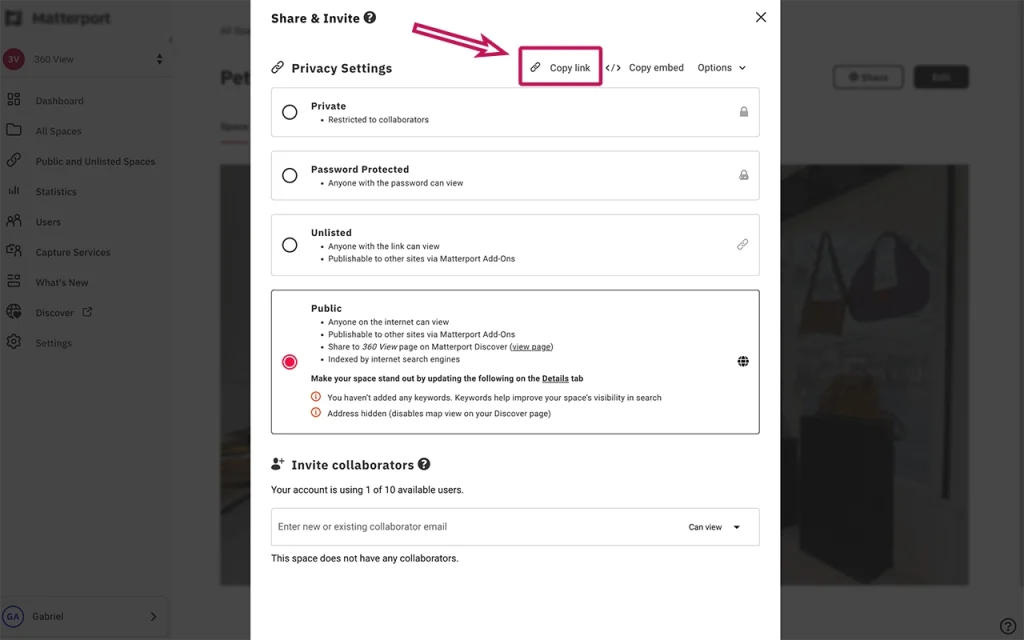
3. Create a new post on Facebook and paste the copied link into the text box. Add a compelling caption to invite viewers to click and explore your virtual space, as shown in the example below.
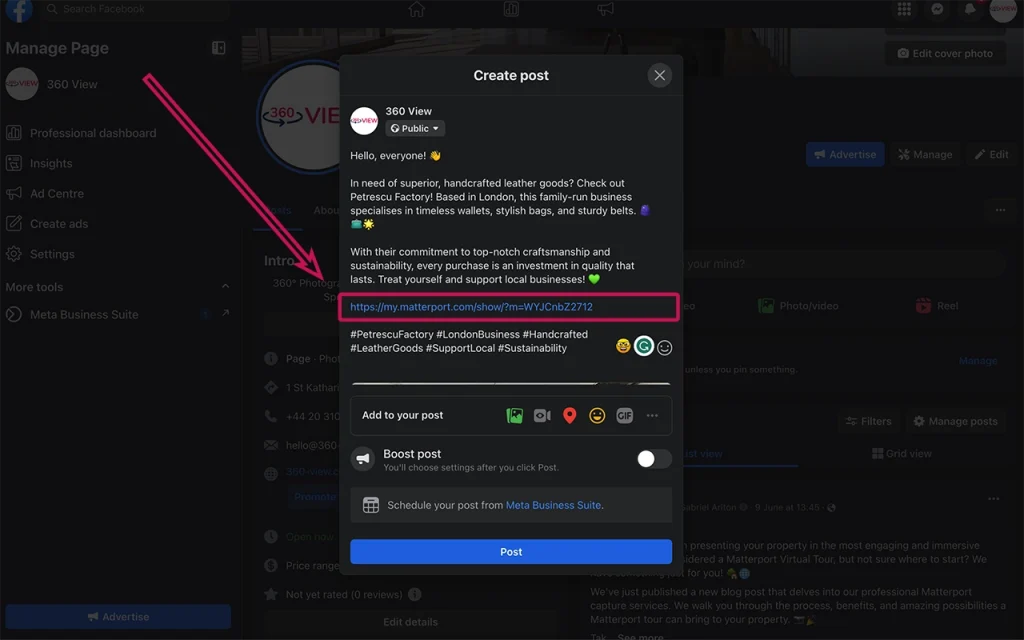
4. Once Facebook generated a preview of your virtual tour click ‘Post’.
5. Upon publication, the post will be available for all to view on Facebook. Viewers who wish to explore the tour will need to click or tap on the post to initiate the virtual tour.

How to Share a Matterport 3D Tour on Instagram
Instagram doesn’t allow clickable links in captions. However, you can include the link in your bio.
- Copy the URL of your Matterport 3D Tour.
- Navigate to your Instagram profile and click ‘Edit Profile’.
- Paste the copied URL into the ‘Website’ field.
- In your post captions, direct users to the link in your bio to view your virtual tour.
How to Share a Matterport 3D Tour on Instagram Stories
- If your account is verified or you have over 10,000 followers, you can include the tour link in your Instagram Stories. Simply click the ‘link’ icon at the top of your story, and paste the URL.
How to Share a Matterport 3D Tour on Twitter
- Copy your Matterport 3D Tour URL.
- On Twitter, click the ‘Tweet’ button.
- Paste the URL into the ‘What’s happening?’ text box.
- Add a caption, and click ‘Tweet’.
How to Share a Matterport 3D Tour on LinkedIn
- Copy your Matterport 3D Tour URL.
- On LinkedIn, click on ‘Start a post’.
- Paste the URL into the post box.
- LinkedIn will automatically generate a preview of your virtual tour. Add some text to provide context to your post, and click ‘Post’.
How to Share a Matterport 3D Tour on YouTube
Matterport allows you to generate a teaser video of your virtual tour. Once you’ve generated this video:
- Go to YouTube and click on ‘Create a video or post’ button at the top right corner.
- Click on ‘Upload video’.
- Select the video file from your computer and click ‘Open’.
- Fill in the necessary details (title, description, etc.), and click ‘Publish’.
How to Share a Matterport 3D Tour on TikTok
While you can’t share the full Matterport 3D Tour on TikTok, you can create a short, engaging video showcasing your virtual space:
- Use the teaser video function on Matterport to create a video.
- Upload this video to TikTok and add an engaging caption encouraging viewers to check out the full tour (you can provide the URL in your bio).
By effectively sharing your Matterport 3D Tour across these various social media platforms, you can significantly enhance the reach and engagement of your virtual tour.
Harnessing Real Estate Platforms for Your Matterport 3D Tour
Sharing Your Matterport 3D Tour on Real Estate Listing Platforms
Real estate platforms are the go-to place for individuals looking to buy or rent properties. As such, showcasing your Matterport 3D Tour on these platforms can be a highly effective way to attract potential buyers or tenants, giving them a comprehensive view of your space, no matter where they are in the world.
How to Share a Matterport 3D Tour on Zoopla
Zoopla is a popular real estate platform where you can share your Matterport 3D Tour. Here’s how:
- Create your Matterport 3D Tour and navigate to the 3D Showcase for your space.
- Copy the URL.
- On your Zoopla listing, navigate to the ‘Media’ section and click on ‘Add Virtual Tour’.
- Paste the URL into the provided field and click ‘Save’.
Your virtual tour is now available for potential buyers or renters to view on your Zoopla listing.
How to Share a Matterport 3D Tour on Rightmove
Rightmove, one of the UK’s largest online real estate portals, also accepts virtual tours. Here’s how to add yours:
- Copy the URL of your Matterport 3D Tour.
- Log into Rightmove Plus and find the relevant property.
- Go to ‘Edit property details’, then ‘Add/edit media’ and select ‘Virtual tour’.
- Paste your copied URL into the ‘Virtual tour URL’ field and click ‘Save’.
Your Matterport 3D Tour is now accessible to potential clients on Rightmove.
How to Share a Matterport 3D Tour on Onthemarket
Onthemarket is another excellent platform to showcase your Matterport 3D Tour. Follow these steps:
- Navigate to the 3D Showcase for your Matterport 3D Tour and copy the URL.
- Log into your Onthemarket account and go to the ‘My properties’ section.
- Find the property you wish to add the virtual tour to and click ‘Edit’.
- Go to the ‘Virtual Tour’ tab, paste the URL into the ‘Virtual tour link’ field, and click ‘Save’.
The Matterport 3D Tour is now live on your Onthemarket listing, ready to impress potential buyers or tenants. By leveraging these real estate platforms, you can significantly increase the visibility and engagement of your Matterport 3D Tour, helping you to attract more potential buyers or tenants and ultimately close deals more efficiently.
Utilising Business Listings and Review Websites for Greater Visibility
Sharing your Matterport 3D Tour on Business Listings and Review Websites
Business listings and review websites are popular go-to sources for consumers looking for services or places to visit. Featuring your Matterport 3D Tour on these platforms can give your business a competitive edge by allowing potential customers to virtually explore your space before they decide to visit.
How to Share a Matterport 3D Tour on TripAdvisor
TripAdvisor is one of the world’s largest travel platforms and is ideal for businesses in the hospitality industry.
- Navigate to your Matterport 3D Tour and copy the URL.
- Log into your TripAdvisor Management Centre and select ‘Manage Listing’.
- Click on ‘Photos and Videos’, then ‘Add more photos’.
- In the ‘Virtual tours’ section, click on ‘Add a virtual tour’ and paste your copied URL.
- Click ‘Submit’. TripAdvisor’s team will review the tour before it goes live on your listing.
How to Share a Matterport 3D Tour on Bing
Bing Places allows businesses to add a virtual tour to their listing.
- Copy your Matterport 3D Tour URL.
- Log into your Bing Places dashboard, select your business, and click ‘Edit’.
- Scroll down to ‘Photos and videos’, then click on ‘Add virtual tour’.
- Paste the URL and click ‘Save’. Your virtual tour will now appear in your Bing Places listing.
How to Share a Matterport 3D Tour on Yellowpages
Yellowpages is a comprehensive business directory and also allows businesses to add a virtual tour.
- Copy your Matterport 3D Tour URL.
- Log into your Yellowpages account, find your business listing, and select ‘Manage this listing’.
- Click on ‘Add multimedia’ and select ‘Virtual tour’.
- Paste the URL in the space provided and click ‘Submit’. Your virtual tour will appear in your Yellowpages business listing after approval.
Incorporating your Matterport 3D Tour into your business listings and review websites can improve your online visibility, enrich your listing content, and provide an engaging experience for potential customers as they research your business.
Use print or digital materials to share your Matterport 3D Tour
How to share a Matterport 3D Tour using a QR Code
Sharing a Matterport 3D Tour using a QR code is an efficient and interactive way to provide immediate access to your virtual tour. This method can be particularly beneficial in scenarios where people have immediate access to their smartphones and can scan the QR code on the spot. Here’s a simple step-by-step guide on how to share a Matterport 3D Tour using a QR code:
Step 1: Access Your Tour’s URL: The first thing you need to do is navigate to your Matterport 3D tour and copy the URL from your browser’s address bar.
Step 2: Find a QR Code Generator: Numerous QR code generators are available online for free, such as QR Code Generator, QR Code Monkey, or QRStuff.
Step 3: Input Your URL: Paste your Matterport 3D Tour URL into the generator’s URL field.
Step 4: Customize Your QR Code: You can choose to customize the design of your QR code. You might want to select specific colours or incorporate your logo. This adds a touch of personalization and branding.
Step 5: Download the QR Code: Download your custom QR code, typically available as a PNG or JPEG image.
Step 6: Distribute Your QR Code: Now, your QR code is ready to be shared! You can print it on marketing materials, incorporate it into your email campaigns, add it to your website, or share it on social media. But why should you consider sharing your Matterport 3D Tour through a QR code? Here are a few reasons:
Convenience: QR codes allow for instant access to the tour. All a user has to do is scan the code with their smartphone, and they’re immediately transported to the 3D tour.
Versatility: QR codes can be added to just about any kind of print or digital material, making them a highly versatile sharing option.
Innovation: Utilizing QR codes can showcase your business as technologically adept and innovative.
Engagement: The process of scanning a QR code can be more engaging and memorable than simply clicking on a link.
Tracking: Many QR code generators allow for tracking scans, which can provide valuable insights about your audience.
Remember, while QR codes can be a powerful tool, their effectiveness relies on your audience’s familiarity and comfort with using them. Always consider providing an alternative method to access your 3D tour.
Ensuring Privacy in Sharing Your Matterport 3D Tour
Sharing Your Matterport 3D Tour Privately
While sharing your Matterport 3D Tour publicly can boost your visibility, there may be times when you want to share it with specific individuals or groups privately. Fortunately, Matterport allows you to do this easily and effectively.
How to Share a Matterport 3D Tour by Email, WhatsApp, or Text Messages
Sharing a Matterport 3D Tour privately via email, WhatsApp, or text message is as simple as sharing a URL. Here’s how:
- Navigate to the Matterport 3D Tour that you want to share and copy the URL.
- If you’re sharing via email, compose your email and paste the URL into the body. You can add a brief message explaining what the recipient will see when they click the link.
- If you’re sharing via WhatsApp, open a chat with the recipient, paste the URL, and hit send. Remember, you can share with individual contacts or in group chats.
- If you’re sharing via text message, compose a new message, paste the URL, and send.
Remember, when sharing privately, it’s essential to ensure that the recipients are people you trust. Also, it would be good to remind them not to share the link without your consent. In conclusion, private sharing of your Matterport 3D Tour is a great way to give selected individuals a comprehensive and immersive view of your property. This can be particularly useful in scenarios where you need to showcase your space to potential investors, partners, or specific clients.
Embedding Your Matterport 3D Tour
How to Embed Your Matterport 3D Tour on Your Blog or Website
Embedding a Matterport 3D Tour directly onto your blog or website can be an effective way to engage visitors and keep them on your site longer. The process is straightforward and doesn’t require any coding knowledge. Here are the steps to embed your Matterport 3D Tour:
- Navigate to your Matterport 3D Tour and click the ‘Share’ button.
- In the share options, click ‘Embed’.
- A window will appear with HTML code. Copy this code.
- Log in to your website or blog’s backend and navigate to the page or post where you want to embed the tour.
- Find the ‘Text’, ‘HTML’, or ‘Code’ view in your editor (this will depend on your website or blog platform).
- Paste the copied HTML code where you want the tour to appear.
- Save and publish your changes.
Now, when visitors navigate to your page or post, they’ll see your Matterport 3D Tour directly on your site. They can interact with it without needing to navigate away, offering an engaging, immersive, and seamless user experience.
The Difference Between Embedding and Sharing a Matterport 3D Tour
While both sharing and embedding allow others to view your Matterport 3D Tour, there’s a crucial difference between them. Sharing sends users to the URL of your tour, taking them off your website. Embedding, on the other hand, keeps users on your site, interacting with the tour while still having access to your other site content.
In conclusion, strategically embedding your Matterport 3D Tours on your website or blog can create a more interactive experience for your site visitors, increase time spent on your site, and ultimately drive higher engagement and conversions.
Optimising Your Matterport 3D Tour for Greater Online Visibility: A Recap
The Future of Matterport 3D Tours
In this blog post, we’ve discussed numerous ways to enhance the visibility of your Matterport 3D Tour online. From understanding the key differences between sharing, embedding, and publishing your tours, to strategically distributing them on various platforms such as social media, real estate listings, and business review websites, each strategy has its unique potential to drive visibility and engagement. Publishing your tours on Google Maps exposes your business to millions of daily users, enhancing your location’s discoverability. Sharing them on social media platforms taps into your existing networks and enables your tours to reach a wider audience. Real estate platforms and business listing websites offer another level of exposure, specifically to those already looking for services like yours.
And finally, embedding these tours on your website or blog promotes an interactive and immersive user experience, potentially improving site metrics and conversions. But it doesn’t stop here. As technology continues to evolve, we can expect to see even more innovative ways to leverage Matterport 3D Tours. The advancement in virtual reality (VR), augmented reality (AR), and other immersive technologies will likely offer even more opportunities for businesses to showcase their spaces and engage their audiences. In a digital-first world where online visibility can make or break your success, optimising your Matterport 3D Tours is not just an option – it’s a necessity.
Stay ahead of the curve by utilising these strategies effectively and prepare to take your online presence to the next level. Your virtual world awaits! If you have any questions or need a virtual tour specialist to create your Matterport 3D tour, please contact us.
To keep updated with the most interesting trends and news about Matterport 3D Tours connect with us on Facebook, Instagram, LinkedIn, and Twitter!
Explore more from 360 View: Matterport Digital Twins, virtual tours for hotels, view our project portfolio.
Frequently Asked Questions
Can I view a virtual tour on my phone?
Yes. All 360 View tours are mobile-optimised and work seamlessly on phones. You can view in standard mode or turn your phone for an immersive landscape experience.
What’s the cost difference between Standard and Premium tours?
Premium tours cost more due to higher capture resolution, more positioning points, advanced editing, or enhanced features. Standard tours are excellent value; premium suits properties where maximum detail and quality are critical.
How does a virtual tour differ from video?
Videos show one fixed perspective. Virtual tours let customers explore at their own pace, moving through space freely. Tours also load faster, use less bandwidth, and provide better SEO for search engines.
Do I need a password to share a private tour?
Yes. Private tours can be password-protected or restricted to specific users. 360 View generates secure links and password access so only intended viewers can see the tour.
How does virtual tour technology help logistics operations?
Warehouses and distribution centres use virtual tours for facility documentation, client confidence, and space planning. Virtual tours help logistics partners understand capabilities and capacity without on-site visits, saving time and travel costs.
Why do customers trust businesses with virtual tours?
Virtual tours signal professionalism, transparency, and confidence. Businesses willing to show their spaces completely gain credibility. Transparency builds trust better than written descriptions.


