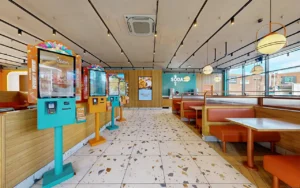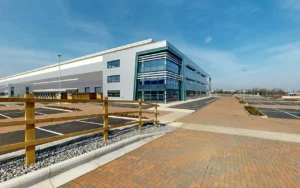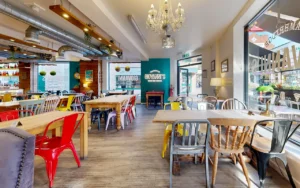
Your business may be open, modern and ready to welcome customers. But if Google Street View shows something different, that is the version many people will believe. This page shows how the right Google Street View virtual tour fixes that, with real before and after examples.
What Happens When Google Street View Shows the Wrong Image of Your Business
When people search for your business on Google Maps, they are not only checking your address. They are deciding whether you are real, open, easy to find, and worth the trip.
For many customers, Street View is part of that decision. They check the storefront, find the entrance, plan accessibility, and compare you with other options nearby.
So what happens when the image is wrong? Your business may look closed, hidden, or like a completely different company. That creates doubt, and doubt quietly becomes a lost visit.
The image on Google might show an old tenant, a shuttered shop, building works, or a bus, van or scaffolding across your entrance. It might even show your door from an angle that makes it impossible to tell which one is yours.
Why Google Street View Is Often Out of Date
Google Street View is not live. It shows one moment captured by the Google car, sometimes several years ago.
In some streets the car returns often. In others it has not passed for years, and some areas have no coverage at all. This depends on the area, access, route planning, weather and Google’s own priorities.
That means you can move in, refit the front, change the signage, or completely upgrade the customer experience, while Google Street View still shows the old version of your address.
Common Google Street View Problems for Storefront Businesses
Business owners contact us with the same question: “Can you remove the old Street View image and replace it with a correct one?” Usually it comes down to one of these five problems.
1. Street View Still Shows the Previous Business
A new business opens at an address, but Google’s latest image was captured before the change. A customer opens Street View and sees the old company, then wonders if you have moved, closed, or never opened at that location.
2. A Vehicle or Obstruction Blocks Your Storefront
The Google car passes at the wrong moment. A bus, truck, delivery van, parked car, scaffolding or rubbish bins block the entrance, and your business looks hidden, closed or hard to reach.
3. The Image Is Captured From the Wrong Position
Street View is captured from a moving vehicle, so the frame may not line up with your entrance. This is especially confusing in shared buildings, shopping streets, arcades, clinics, gyms, hotels and showrooms with several neighbouring doors.
4. Your Business Looks Closed or Unpolished
Even at the right address, the shutters may be down, the signage hidden, or the image captured before a refurbishment. The business has done nothing wrong. The image is simply unlucky.
5. The Google Car Never Covered Your Location
Google’s cars drive public roads only. Private developments, gated areas, courtyards, campuses, pedestrian routes and internal access roads are often missing. If customers need visual help to reach you, that gap makes the whole journey feel uncertain.
Why customers check Street View before visiting
Street View is not only for tourists. It is used by real customers making practical decisions before they travel. They want to know:
- Where exactly is the entrance?
- Is this business really at this address?
- Does the place look open and professional?
- Can I access it with a wheelchair, pushchair or mobility aid?
- Is there parking nearby, and is it worth the trip?
- Does this business look more trustworthy than the next option?
If the image creates confusion, most customers will not contact you to ask. They simply choose someone else.
Can you make Google update Street View?
You can report outdated imagery to Google, but you cannot send the Google car back on demand, and you cannot choose when, or whether, a new image appears.
Even if the car returns, nothing guarantees a clear result. A van could still block the front. The angle could still be wrong. The problem can stay visible on Google Maps for months or years.
What 360 View Does Differently
We help you take control of how your business appears on Google. The goal is to move you from being found to being understood, so customers know your space before they arrive.
We do more than fix a single image. We create a connected Google Street View virtual tour that starts on the pavement, walks through your entrance, and continues inside, so customers experience your business the way they would in person.
Depending on your location and the problem, a tour can show:
- The correct storefront, clearly, from the street.
- A recognisable entrance, so customers know which door is yours.
- The walk from outside to inside, in one connected journey.
- Your layout, size and design, so the space feels familiar.
- Your products, services and atmosphere, not just a facade.
- Outdoor coverage for areas the Google car never reached.
Instead of relying on an old or unlucky Google car image, your business shows a current, professional and carefully planned view.
Why a Planned Capture Beats Waiting for the Google Car
A Google car captures whatever happens to be there. A professional capture is planned around you.
Before we arrive, you have time to prepare. Clean the storefront, make the signage visible, arrange products and clear the entrance. We also choose the best time of day for light, traffic and footfall.
The result is not a random moment. It is your space at its authentic best. We also blur faces, number plates and sensitive details for privacy.
Before and After: How the Right Street View Image Changes the Customer Experience
Before the update, a customer may see an old or blocked image and think “I am not sure this is the right place,” “Is it still open?” or “Where is the entrance?” Then they choose somewhere else.
After the update, they see the correct storefront, recognise the entrance, and move inside before they ever leave home. That builds confidence and removes friction, because they understand the space before they visit.
Below are real examples of businesses we helped fix exactly this on Google Maps.
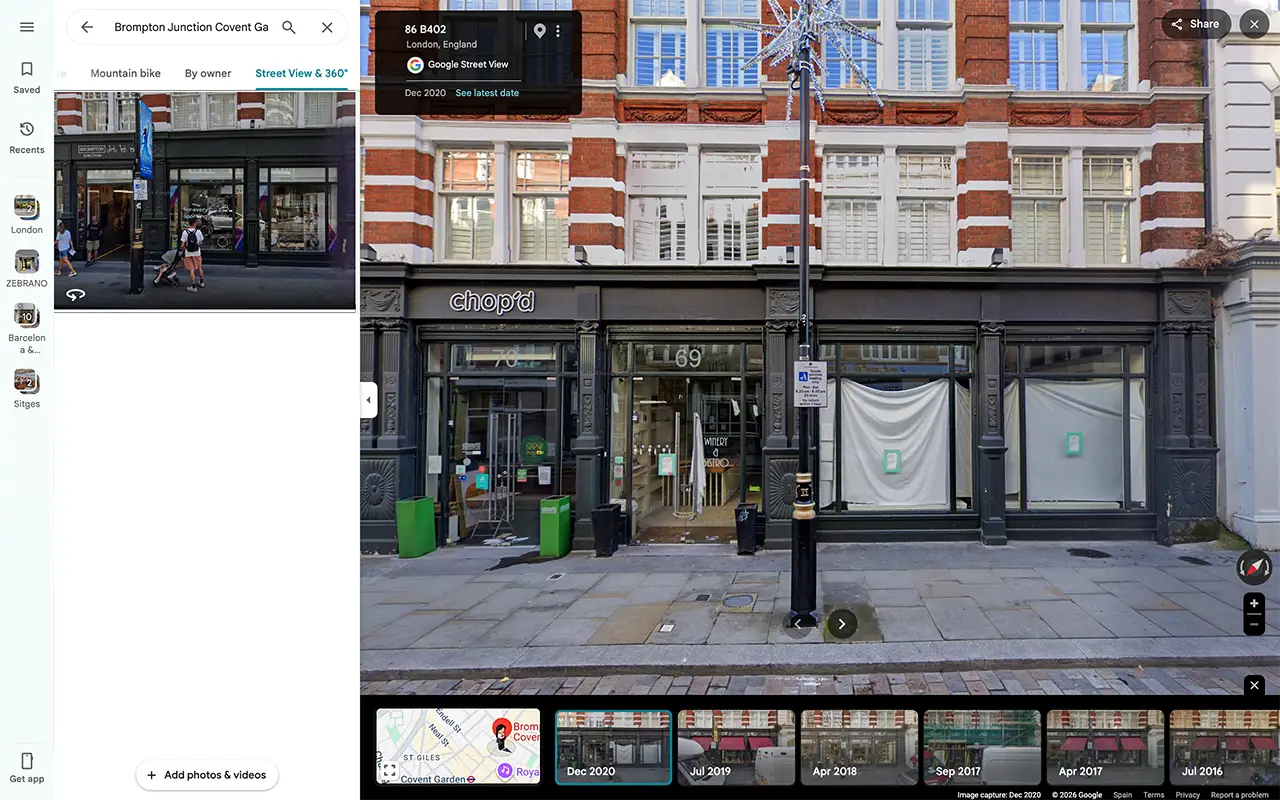
Brompton Junction Store – Street View Before and After
One example is Brompton Junction Covent Garden.
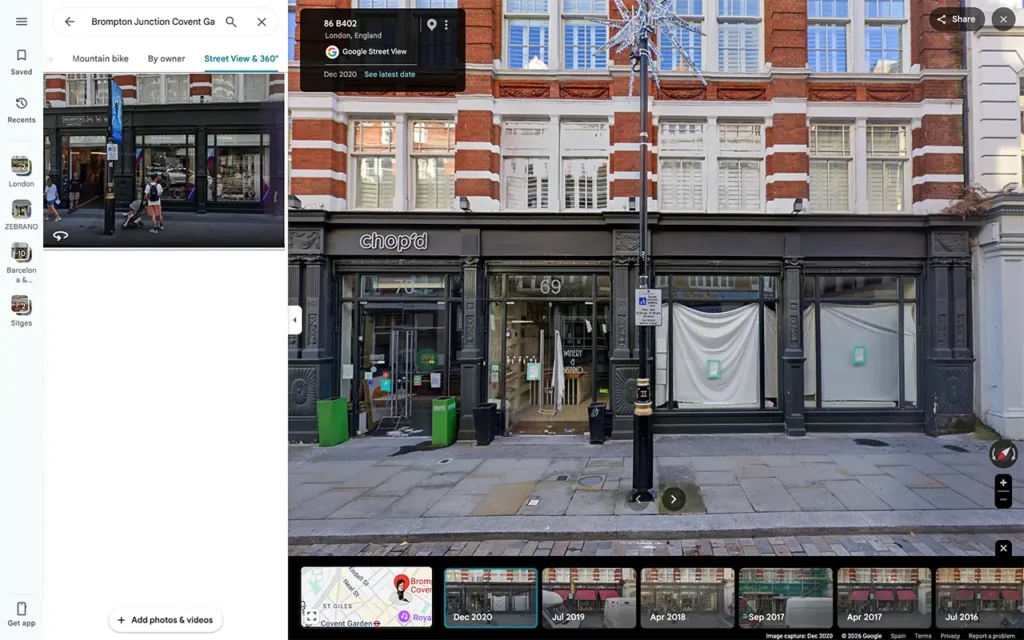
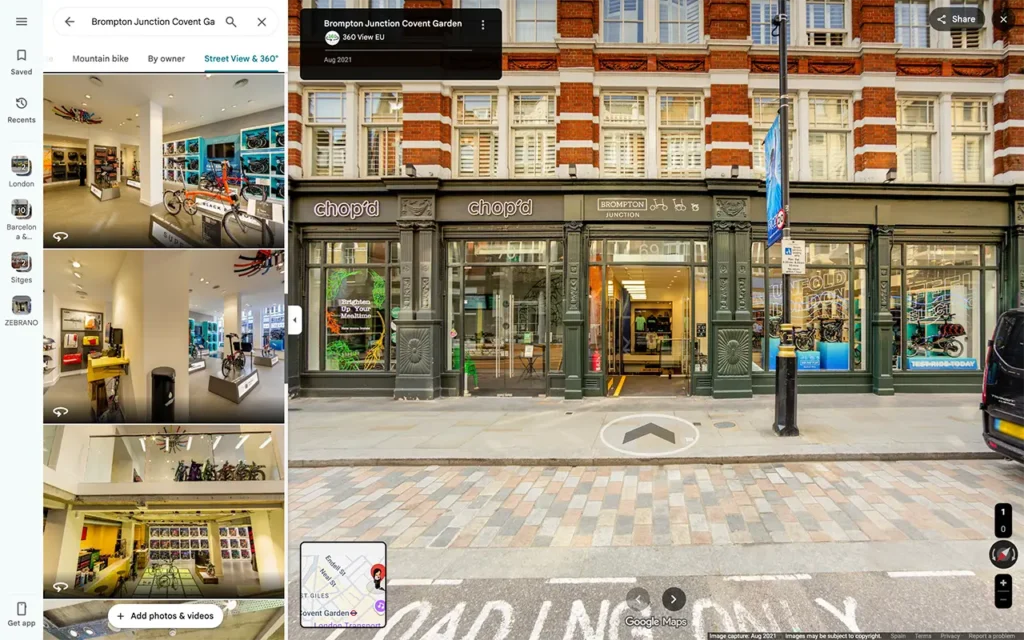
When this store moved into its new Covent Garden location, Google Street View still showed the previous situation at the address, including a closed-down business and refurbishment work inside the unit. For anyone checking on Google Maps, that was not a welcoming first impression.
We created a Google Street View virtual tour showing the correct storefront and letting customers explore the business inside.
Since we published the tour for Brompton Junction Store in Covent Garden, around five years ago, Google reports it now receives around 4,780 views every week. A storefront image is not just a picture. It is part of how customers decide whether to trust, visit and engage with a business.
Idyllica Wine Store – Street View Before and After
Another example is: Idyllica Wine Store
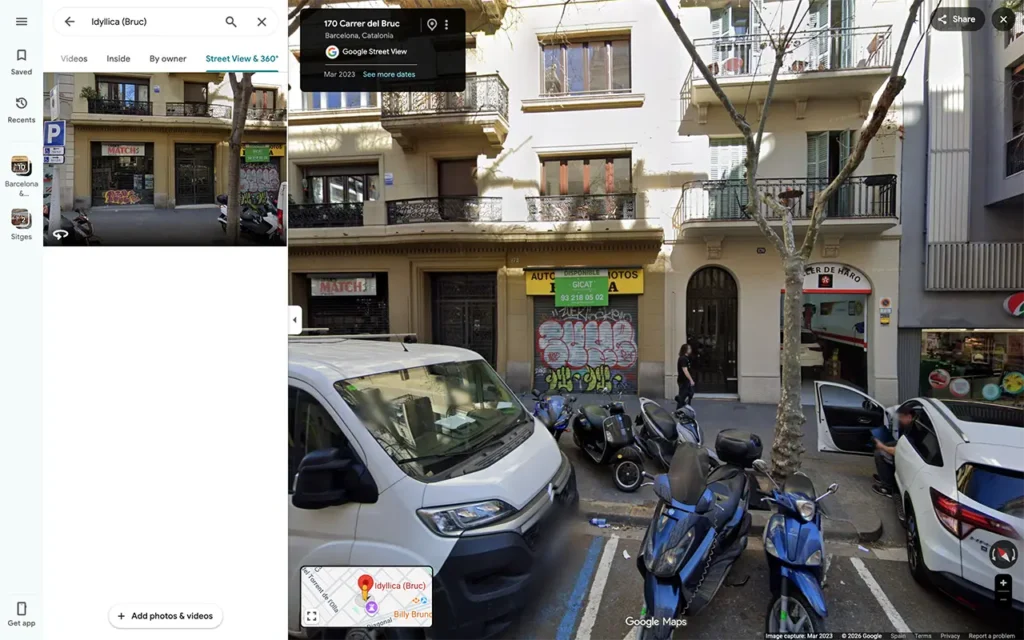
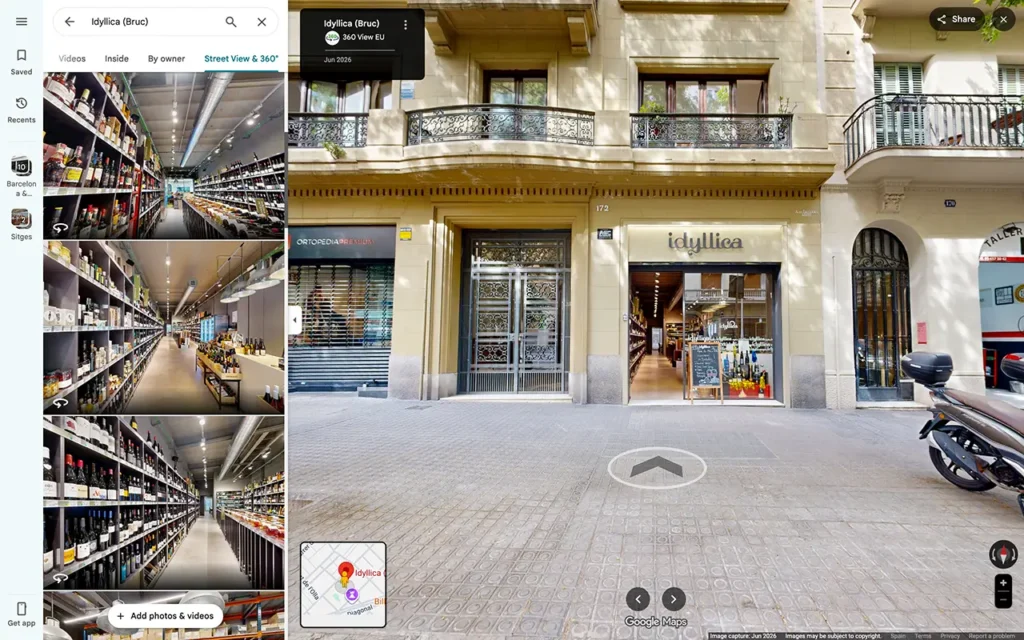
Before our visit, Google Street View still showed the business that occupied the unit before Idyllica moved in. Customers searching for Idyllica Wine Store found an unfamiliar shopfront and had every reason to wonder whether they had the wrong address, or whether the shop existed at all.
We captured a current Google Street View virtual tour of the correct storefront and connected it to a walk inside, so customers can see the shop, the displays and the atmosphere before they arrive.
The confusion disappears instantly. Anyone checking the location now sees the real Idyllica Wine Store, not the business that used to be there.
London Private Hospital – Street View Before and After
3rd example is: London Private Hospital
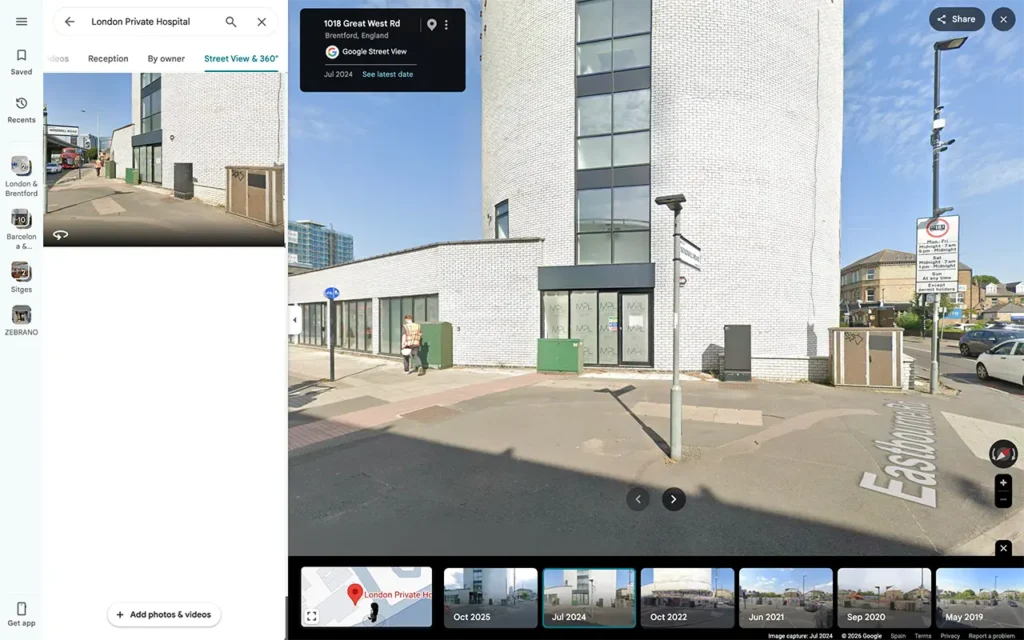
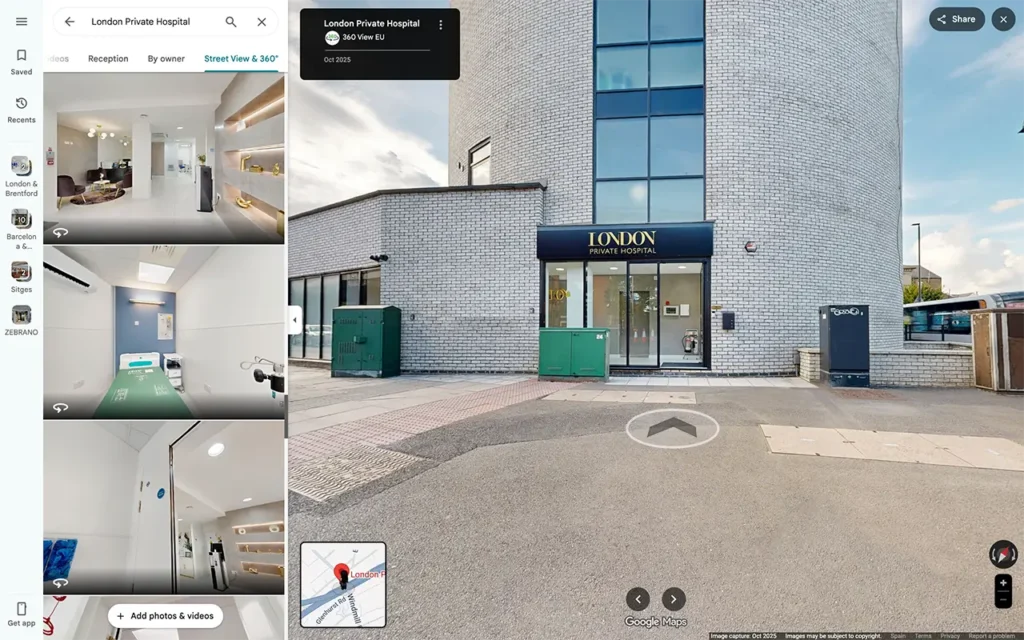
Google Street View showed the building during construction, with the windows covered and no
clear entrance or signage in view. To a patient checking the location, London Private Hospital, looked more like a residential building than a hospital. That is exactly the wrong impression when someone is already anxious about an appointment.
Because the building and its approach were new, the Google car had no current image showing the hospital as it is today. Waiting for an update was not a realistic option.
We captured the hospital as it now appears, with a clear entrance, visible signage and a connected walk that guides patients from the street to reception. Visitors can recognise the building, find the right door, and arrive with confidence.
Carmina Rotger Store – Street View Before and After
4th example is: Carmina Rotger Store
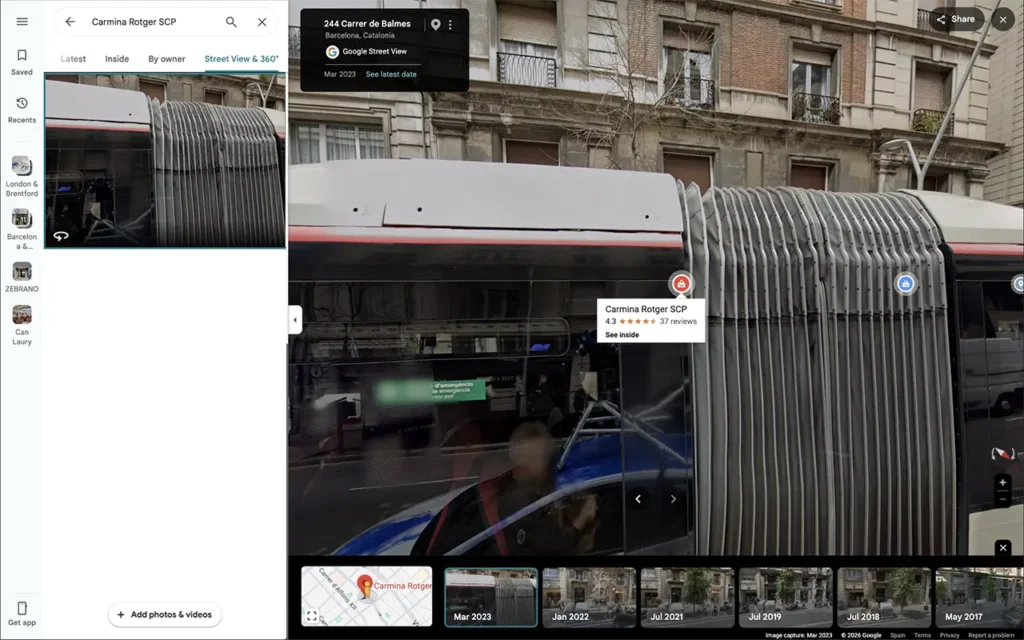
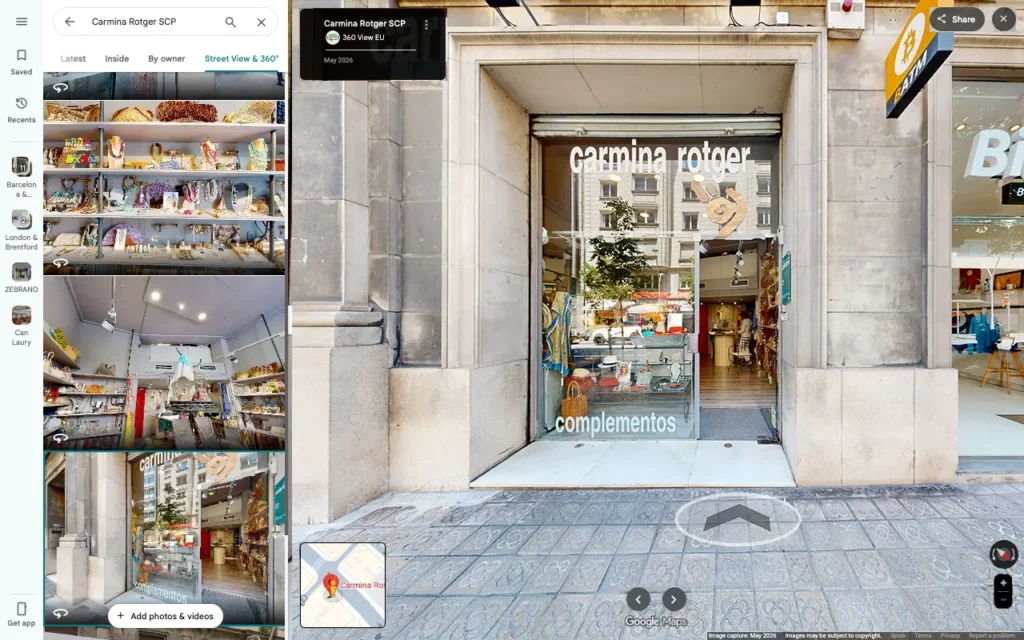
When the Google car passed Carmina Rotger, a bus was stopped directly in front of the store. The shopfront was hidden, and customers could not tell what the business looked like or even confirm they were in the right place.
This is one of the most common Street View problems, and one of the most frustrating, because the business did nothing wrong. The timing was simply unlucky.
We captured a clear view of the storefront with nothing blocking it, then connected it to a tour inside the store. Customers can now see the shopfront, recognise the entrance, and explore the space before they visit.
Does a Google Street View Virtual Tour Replace the Google Car Image?
Not always. The official Google car imagery may still exist in Street View history, and Google decides which image appears by default in each part of the map.
What a professional 360 tour does is add current, business focused imagery to your Google presence. It shows the correct storefront, connects the outside to the inside, and gives customers a much clearer understanding of your business. See similar projects. For most businesses, that is enough to remove confusion and build trust.
Why This Matters for Local SEO and Customer Trust
Your Google Business Profile, Maps listing, reviews, photos and Street View all work together. A customer may find you in Search, open your profile, read reviews, look at photos, then check Street View to confirm the location.
If everything is consistent, you look reliable. If your photos show one thing and Street View shows an old or blocked storefront, the customer hesitates. A current virtual tour keeps your online presence consistent, which supports trust and gives people a reason to choose you.
Who Benefits Most From an Updated Google Street View Presence
This is especially useful for businesses that depend on physical visits, including:
- Retail stores, showrooms and car dealerships
- Restaurants, cafes, pubs and hotels
- Gyms, fitness studios and beauty salons
- Clinics, dental practices and pharmacies
- Estate agents, coworking spaces and local service businesses
- Schools, training centres and event venues
If customers visit your location, your Google Street View presence matters.
What to Do if Google Street View Shows the Wrong Storefront
If your business looks outdated, blocked or confusing on Google Street View, you have three practical options.
- Report outdated imagery to Google. This flags where an update is needed, but there is no guaranteed timeline.
- Improve your Google Business Profile photos. Upload current images of your storefront, entrance, interior and team so customers see accurate information.
- Create a professional Google Street View virtual tour. This is the most controlled option. It shows the correct storefront, connects the outside to the inside, and gives customers a clear way to explore your business before visiting.
Take Control of How Your Business Appears on Google Maps
You cannot control when the Google car passes, or whether a bus, truck, bin or scaffolding appears in front of your store when it does.
You can control how your business is presented with a professional Google Street View virtual tour. If your storefront looks outdated, blocked or confusing, we can help you create a clearer, more accurate and more professional view.
At 360 View, we work with businesses across the UK and Europe to create Google Street View virtual tours, indoor walk-throughs and outdoor 360 imagery that helps customers understand, trust and visit real places. If your business is open to customers, your Google Maps presence should show that clearly.
For the practical next step, see how a Google Street View virtual tour is captured and published, then use our provider checklist to compare recent work, pricing, publishing arrangements and aftercare. Retailers and showroom operators can also see how the service applies to their sector.
Frequently asked questions
How Often Does Google Update Street View?
There is no fixed schedule. Some areas are updated often, while other Street View imagery can stay visible for years.
Can I Ask Google to Update the Street View Image of My Business?
You can report outdated imagery to Google, but Google does not guarantee when a new image will be captured or published.
Can a Professional 360 Tour Remove the Old Google Car Image?
A professional tour does not always remove the official Google car image, but it adds current, useful imagery to your Google Maps presence and helps customers see the correct storefront and interior.
What if a Bus, Van or Truck Blocks My Storefront on Street View?
A professional capture shows your storefront at a better moment, when the entrance is clear and the business looks its best, as we did for Carmina Rotger.
Can You Add Street View Where the Google Car Never Went?
Yes. For private roads, gated developments, courtyards, campuses and pedestrian approaches the Google car cannot reach, we can capture and publish new 360 coverage to Outdoors Google Street View so customers can find and explore your location.
Can Customers Walk From the Street Into My Business Online?
Yes. A connected Google Street View virtual tour guides users from the outside into the interior, helping them understand the entrance, layout and customer experience.
Is This Useful for Small Businesses?
Yes. Local customers often use Google Maps to decide where to go, so a clear storefront and virtual tour can build trust before the visit.
Why Should I Not Just Wait for the Google Car?
Because you cannot control when it passes, what it captures, or whether the new image shows your business clearly. A professional capture gives you control over how your business appears online.
Ready to Fix How Your Business Looks on Google Maps?
You tell us what you need, we handle the complexity, and your business goes live on Google Maps. Three simple steps:
- Plan the route. We map the journey from your street to inside your business.
- Capture and build. We capture your storefront and interior at their best, then build the connected tour.
- Go live on Google Maps. Your virtual tour is published to your Google Business Profile for customers to explore.
Get a free quote for your location. Call 020 3103 9980 or send us a message and we will show you how your business could look on Google Maps.